An Optimized Way of Paging and Sorting
What are conventional way for Paging and Sorting-
Usually we do following steps to enable paging and sorting in our GridView,
- Set
AllowPaging and AllowSorting Properties of GridView to True to enable paging and sorting respectively e.g
    <asp:GridView ID="GridView1" runat="server" AllowPaging="true" AllowSorting="true"  >
     </asp:GridView>
- Set
PageSize property to mention how many records will be display on each page.
- Set
SortExpression property of each column. By default each DataBound columns has bounded column name as default value for SortExpression property.
- Handle
PageIndexChanging and Sorting Events of GridView to respond Paging and sorting actions respectively e.g
    <asp:GridView ID="GridView1" runat="server" AllowPaging="true"
                AllowSorting="true" onpageindexchanging="GridView1_PageIndexChanging"
                onsorting="GridView1_Sorting"  >
            </asp:GridView>
     protected void GridView1_PageIndexChanging(object sender, GridViewPageEventArgs e)
    {

// Implement some paging logic here
    }
    protected void GridView1_Sorting(object sender, GridViewSortEventArgs e)
    {

// Implement sone sorting logic here
}
Problem:-
In conventional way of paging and sorting we get complete set of data instead of getting part of data that is required to display on current/requested page. As you can see that on each pageIndexChanging call, we are getting all the data from our data source and then bind it to GridView. Ideally we should get only that data that is required to display on requested page.
High Level Overview
We will optimize the code on both Database and Presentation layer
At the Database Level we will write a stored procedure in such a way that it would return only one page records. That stored procedure take Page Size, Page Index and Sort Expression as input parameters and return sorted record for particular page index.
At the Presentation layer, we will use
ObjectDataSource’s virtual paging feature to optimize the paging. Virtual paging is not a term defined by Microsoft, I used it by myself because
ObjectDataSource expose some properties and method that allow us to bind only one page data with GridView and to define total number of records in database (not in one page), so that GridView can extract out total number of pages that needs to be display in page area of GridView. In the next sections we will see what these properties and methods are? and how to use them?
Implementation Details:
Database Layer:
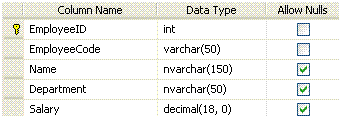
We have an employee table in database with following schema
and we wrote a following stored procedure that has two select statements. First select statement will return the total number of employee in Employee table and second dynamic select statement will return one page sorted record according to the provided start index, page size, and sortby by parameters
 Collapse
 |
Copy Code
Create PROCEDURE spGetAllEmployee
 (
 @startIndex  int,
 @pageSize  int,
 @sortBy  nvarchar(30),
 @totalEmployees int OUTPUT
 )
AS
 SET NOCOUNT ON

 DECLARE
    @sqlStatement nvarchar(max),
    @upperBound int

  IF @startIndex  < 1 SET @startIndex = 1
  IF @pageSize < 1 SET @pageSize = 1

  SET @upperBound = @startIndex + @pageSize


 Select @totalEmployees=Count(*) From Employee

  SET @sqlStatement = ' SELECT E.EmployeeID, E.EmployeeCode, E.Name, E.Department, E.Salary
                FROM (
                      SELECT  ROW_NUMBER() OVER(ORDER BY ' + @sortBy + ') AS rowNumber, *
                      FROM    Employee
                     ) AS E
                WHERE  rowNumber >= ' + CONVERT(varchar(9), @startIndex) + ' AND
                       rowNumber <  ' + CONVERT(varchar(9), @upperBound)
  exec (@sqlStatement)
One thing that i want to explain in above stored procedure is
ROW_NUMBER() function that make it possible for us to select only one page data.
ROW_NUMBER() method is included in 2005 release of TSQL, it actually add an integer column in selected record set, that contain the record number for each record . It seems very simple but infact it very helpful while we are going to perform nested queries. As we did in our stored procedure, in nested query we select all employees record sorted by the provided sort expression and add a row number for each record using
ROW_NUMBER() method, and in outer query we filter the resulted rows by using lower and upper bound indexes so that we return only those rows which lies in lower and upper bounds.
Data Access layer:
In Data Access Layer we will write a class that will be responsible to call
spGetAllEmployee stored procedure to get employee records and return employee list to the business logic layer. To avoid the complexity and length of article i am only posting the code is used to fetch the records from database, I am not posting any helper code/classes, however complete code is available for
download .
Collapse |
Copy Code
public List<EmployeeInfo> GetAllEmployee(int startIndex, int pageSize, string sortBy,ref int totalEmployees)        {
            IDbConnection connection=null ;
            IDbCommand selectCommand=null ;
            List<EmployeeInfo> employeeInfoList;
            DataSet employeeDS = new DataSet();
            IDbDataAdapter dataAdapter = DataObjectFactory.CreateDataAdapter();
            try
            {
                using (connection = DataObjectFactory.CreateConnectionObject())
                {
                    using (selectCommand = DataObjectFactory.CreateStoredProcedureCommand(connection, "spGetAllEmployee"))
                    {

                        selectCommand.Parameters.Add(DataObjectFactory.CreateCommandParameter("@startIndex", SqlDbType.Int, startIndex));
                        selectCommand.Parameters.Add(DataObjectFactory.CreateCommandParameter("@pageSize", SqlDbType.Int, pageSize));
                        selectCommand.Parameters.Add(DataObjectFactory.CreateCommandParameter("@sortBy", SqlDbType.NVarChar, 30, sortBy));
                        selectCommand.Parameters.Add(DataObjectFactory.CreateCommandParameter("@totalEmployees", SqlDbType.Int, 0));
                        ((SqlParameter)selectCommand.Parameters["@totalEmployees"]).Direction = ParameterDirection.Output;

                        if (connection.State != ConnectionState.Open)
                            connection.Open();

                        dataAdapter.SelectCommand = selectCommand;

                        dataAdapter.Fill(employeeDS);

                        totalEmployees = Convert.ToInt32(((SqlParameter)selectCommand.Parameters["@totalEmployees"]).Value);
                    }
                }
            }
            catch (SqlException ex)
            {
                if (connection.State != ConnectionState.Closed)
                    connection.Close();
                DALException mineException = new DALException();
                mineException.ConnectingString = connection.ConnectionString;
                mineException.StoredProcedureName = selectCommand.CommandText;
                mineException.Source = "GetAllEmployee";
                throw mineException;

            }

            employeeInfoList =  ConvertorUtility.ConvertToEmployeeInfoCollection(employeeDS);

            return employeeInfoList;

        }
One thing you might notice that last parameter
totalEmployee of
GetAllEmployee is by reference, it is because of the optimization, we don’t want to perform two seprate database calls to get employees records and total count. Because of the same reason we are returning both things (employee data and total count) from one stored procedure. In presentation layer it will be more clearer to you that what was the necessity of this approach and how it will be helping us.
Business Logic Layer:
Business logic layer will only be calling Data Access layer code to fetch the records. Source code is available in
download.
Presentation Layer:
As we discusses earlier in the artcile that we will use the virtual paging feature of
ObjectDataSource. Object Data Source exposes some interesting properties which is used for virtual paging purpose. To get benefits from these properties you should set
EnablePaging property of
ObjectDataSource to
True. These properties are
StartRowIndexParameterName: Specify the parameter name of Select method of ObjectDataSource’s bounded Type. ObjectDataSource will pass the value to this parameter when user changes the page index. For example, if Grid View page size is 10 and user click page number 3 to view 3rd page then the ObjectDataSource will calculate the value of StartRowIndexParameter by using ( page Size * page Index) formula , in this case it will be 10 * 3= 30. Default value of this property is startRowIndex, which means if we don’t mention any value for this property then Select method should have startRowIndex parameter.MaximumRowsParameterName: Specify the parameter name of Select method of ObjectDataSurce’s bounded Type. ObjectDataSource will pass the value to this parameter when user changes the page Index. ObjectDataSource source get its value from GridView’s PageSize property. Default value of this property is maximumRow. which means if we don’t mention any value for this property then Select method should have maximumRow parameter.SelectCountMethod: Specify the method name of ObjectDataSource’s Type. This method will be called by ObjectDataSource to get the total number of records in database. This count will help ObjectDataSource to create virtual paging in the Grid. For example, if GridView page size is 10, and SelectCountMethod return 100 as total number of employees in database then ObjectDataSource will display 10 page indexes in GridView page areas ( However we didn’t get all 100 records from data base)SortParameterName: Specify the parameter name of Select method of ObjectDataSource’s bounded Type. ObjectDataSource will pass the value to this parameter when user click on any column header to sort the data according to that column. ObjectDataSource fetch the value from SortExpression property of particular GirdView column
Now if you see all these three properties togather then you will understand that
SelectCountMethod will use to display virtual page indexes in GridView and on each page index change we will use values of
StartRowIndexParameterName and
MaximumRowsParameterName parameters to query database to fetch desired page data only.
As you know that we already written stored procedures, data access and business logic code which accpet these parameters and return the only one page sorted data. So it's time to use them by passing these parameters values to them.
It’s enough in theory, now let’s talk something in C# and ASPX,
ASPX: Markup of GridView and ObjectDataSource
Collapse |
Copy Code
<asp:GridView ID="GridView1" DataKeyNames="EmployeeID" runat="server" AllowPaging="True" AutoGenerateColumns="False"
        CellPadding="4" DataSourceID="ObjectDataSource1" ForeColor="#333333" GridLines="None" AllowSorting="True" PageSize="5" >
        <RowStyle BackColor="#EFF3FB" />
        <Columns>
            <asp:BoundField DataField="EmployeeID" HeaderText="EmployeeID" ReadOnly="true" SortExpression="EmployeeID" />
            <asp:BoundField DataField="EmployeeCode" HeaderText="EmployeeCode" SortExpression="EmployeeCode" />
            <asp:BoundField DataField="Name" HeaderText="Name" SortExpression="Name" />
            <asp:BoundField DataField="Department" HeaderText="Department" SortExpression="Department" />
            <asp:BoundField DataField="Salary" HeaderText="Salary" SortExpression="Salary" />
        </Columns>
        <FooterStyle BackColor="#507CD1" Font-Bold="True" ForeColor="White" />
        <PagerStyle BackColor="#2461BF" ForeColor="White" HorizontalAlign="Center" />
        <SelectedRowStyle BackColor="#D1DDF1" Font-Bold="True" ForeColor="#333333" />
        <HeaderStyle BackColor="#507CD1" Font-Bold="True" ForeColor="White" />
        <EditRowStyle BackColor="#2461BF" />
        <AlternatingRowStyle BackColor="White" />
    </asp:GridView>

<asp:ObjectDataSource ID="ObjectDataSource1" runat="server" SelectMethod="GetAllEmployees" EnablePaging="true"
        TypeName="EmployeeData" StartRowIndexParameterName="startIndex" MaximumRowsParameterName="pageSize" SortParameterName="sortBy" SelectCountMethod="GetTotalEmployeesCount" >
    </asp:ObjectDataSource>
EmployeeData.cs: A class which is bound to ObjectDataSource
Collapse |
Copy Code
public class EmployeeData
{
private static int employeesCount;
public EmployeeData()
{
}
[DataObjectMethod(DataObjectMethodType.Select)]
public static List<EmployeeInfo> GetAllEmployees(int startIndex, int pageSize, string sortBy)
{
EmployeeBLL objEmployeeBLL = new EmployeeBLL();
List<EmployeeInfo> result;
int totalEmployees=0;
if (string.IsNullOrEmpty(sortBy))
sortBy = "EmployeeID";
result = objEmployeeBLL.GetAllEmployee(startIndex, pageSize, sortBy, ref totalEmployees);
employeesCount = totalEmployees;
return result;
}
public static int GetTotalEmployeesCount()
{
return employeesCount;
}
}
Nothing special here to explain because we are calling already explained code to get one page sorted data by passing
ObjectDataSource provided values. But one thing that I want to explain from optimization point of view, We are getting
employeesCount in
GetAllEmployees() method, and in
GetTotalEmployeesCount() we only return that value, instead of fetching the count from database. What people usually do is , they send seprate database call to fetch the count which is an unnecessary step because we can write our stored procedure and data acess and business logic layer in such a way in which we can get the actual data and total count in one database call.
you can find this on code project.